Laman

Rabu, 13 Maret 2013

DIY purse : Animal Print Makeover

Hello everyone and Hello March! My hands have been itching because doesn't make anything on my blog for a long time :) And now I want to share with you how to make my new favorite and you should too :D
 Here it is...


Kamis, 31 Januari 2013

Quotes for soul


Sometimes we are busy to felicitate ourselves until forgot to care about around us. whereas if you do good with the others,you will get your own happiness for free without you asking.

Rabu, 09 Januari 2013

DIY : Mukena Bag


In this time, i want to share a little bit about accidentally made this bag. it started when my *mukena bag is gone. I don't remember when exactly but after that, I always keep it in a plastic bag before putting it into my bag at every single time i go (Well, if i remember, i felt how indifferently me at that time :'( ). Later, I thought why I treat my mukena like that. Pathetic. I just realized that it's mean i more in love with my clothes than my mukena which i wore when  i faced to my Lord (Sin. It's what i feel). Therefore, i want to treat my mukena better, i return it into its place. Not into plastic bag! but into the better place :) Yup! and now I think i've had new one better :)

*Mukena (Cloak covering a woman's head and body worn at prayer)


 Now lets time for DIYer! Here we go! \(^o^)/


I wish you're more in love with your mukena and remember this following quote :)


Kamis, 20 Desember 2012

Photoshop tutorial : Dreamy Effect


Hi everyone!  How is your day going?! ^o^ Hopefully your day is filled with love and always be grateful :)

Okey! In this post, i want to show you how to make your photo seems dreamy effect which using photoshop. Honestly, i'm not the expert of photo editing, hehehe.. I just learned  from some articles and other blogs about photoshop editing that I found on google, and it's so much fun! especially after seeing the results what i made and i love it!>.< That's why I want to share it with you :D

 In this case, the main editing technique that will be used is the lens flare filter. This menu will create circles-light and warm-toned glows effect for your photo. You only need photoshop software which have installed in your computer and of course, your photo file! hehe.. (I took my lovely niece photo for this :* )

1. Open your photo file in windows photoshop (file > open) and duplicate your background layer (Ctrl +J)


2. (Filter > render > lens flare) for this photo, I choose the 50-300mm Zoom Lens, increased brightness to 150%, and positioned the flare to the top left. Click OK in the dialog box.


3. Add a curves adjustment like the one below (image > adjustment >curves).


4. Click create new fill or adjustment layer at the bottom of the panel group, and choose solid color. after the dialog box has been opened, change to be #c38d6a for the color and then click OK. Blend mode "Soft light" at panel group.


5. (Layer > New adjustment layer > photo filter), Click OK. Change color to orange and click OK. Use the slider to select density, I choose warming Filter (85) at 50%. and then click OK again. Now,You can play around with the opacity of the layer, I put it down to 45%, it depends how smooth or strong you want the effect to come out.


6. (Layer > New adjustment layer > photo filter) Click OK. After the second dialog box has been opened, select density that you want (i choose at 15%) and click OK.


7. (Layer > new adjustment layer > levels). Use the sliders to play with levels on your photo that you desired.


8. (image > adjustment > curves). For the last step, you don't have to through it. I did it because i want my photo seems brighter, it depends on what  effect of your photo that you want to show.

 
So, once more i say, you can change anything slightly to change the desired effect. ;)
So here is the final result!


I hope you enjoyed this tutorial!


Sabtu, 08 Desember 2012

Necklace on Packaging!


Some time ago, I thought to make a simple packaging with a touch of vintage for my stuff and finally has been realized :D
Now, I'm excited and much more nervous when talking about this project, hehehe .. but this is one of a bunch of my dreams ^o^  so I tried to dare myself to do it [Sigh]. bismillah. Wish me luck! :D


Rabu, 14 November 2012

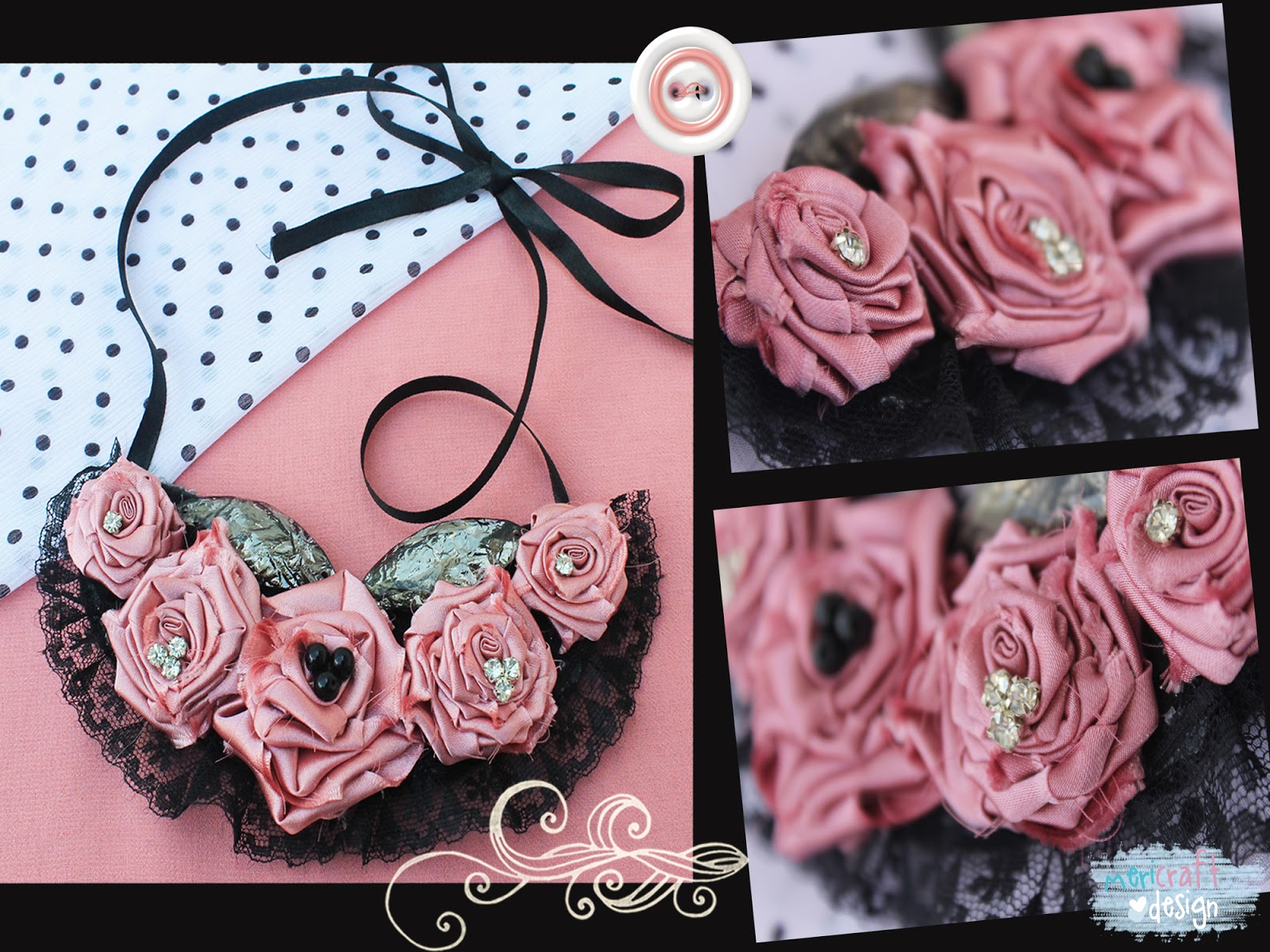
DIY : Rolled Roses Bib Necklace


I don't know  when I exactly liked rolled roses bib necklace because honestly, i say that I am a person who likes things simple and rolled roses bib necklace obviously isn't simple, is it? :D but it doesn't mean I don't want to try it. Did you know because of adding these you look more sweet although keep wearing your simple outfit, so that's why i want to try this one in my outfit :D


Now, lets time to Do It Yourself (DIY) as usual!


Minggu, 21 Oktober 2012

Quote for DIYers!


Anything what i made, it can be inspired from anywhere .. 

And.... i got this quote >>
Power of DIY: 
when you see several details here and there,
and by making it yourself, you mix and match...
JUST THE WAY YOU WANT IT

^o^
Related Posts Plugin for WordPress, Blogger...